



Stay informed with news, updates, and best practices on the ParentSquare blog.
Explore
Core Platform

Solutions for every role in your school community
Built for every type of school and district
See how we solve real challenges facing schools
Insights and ideas that add value to districts
A centralized hub for expert help and guidance

Collecting payments is part of everyday school operations, whether they’re for field trips, device fees, afterschool care, or donation drives. Unfortunately, so are the accompanying headaches, especially when dealing with cash and checks.
When collecting payments involves delivering envelopes of bills to the front office and trying to manually track down who’s paid what and where, shifting to cashless payments isn’t just a matter of keeping up with the times: It can make a meaningful difference in how much money the school collects, and how quickly.
At the same time, implementing online payments often comes with its own set of challenges, from getting teachers and families to use yet another tool to making sure it meets necessary financial and reporting requirements. In the worst case, introducing a district payment tool just adds one more payment format to track.
This guide is designed to provide districts with a practical, engagement-based framework for moving toward fewer cash and check payments, including a bonus calendar with common use cases for online payments.
Going cashless is less about choosing the right payment tool and more about changing how you communicate about payments. By treating online payments as part of everyday family engagement, districts can make it simpler for parents and guardians to complete school payments, streamline payment collection for teachers and staff, and reduce administrative burden without compromising oversight.
Collecting school payments requires constant back-and-forth. From notifying families about fees and costs to sending home reminders—and ultimately receiving payment—each step involves being able to reach and engage your school community.
To make sure you have the right foundation in place to go cashless, set up an online payments infrastructure that prioritizes effective, accessible communication.

As with all communication, access matters. In order to submit their payments, families need a way to know about them first.
While sending home a digital payment request may feel more reliable than a paper form that ends up at the bottom of a backpack, it only works if it reaches families in a way that fits their existing habits.
Consider:
If the answer to any of these questions is no, there’s already a barrier to cashless payments.
After notification, the other half of the payment process is collection. The more steps it takes for families to complete a payment, whether that involves clicking into a separate link or logging into a different payment platform, the lower the response rate and the longer the response time.
To shift more payments away from cash and checks, look closely at how payments are completed online:
Along with increasing the likelihood of missing or delayed payments, multi-step payment processes create administrative burden as well. In many cases, introducing a new payment platform means having to walk families through the process of creating accounts, as well as the time and costs of maintaining yet another tool.
Build payments into your communication platform
When districts use ParentSquare Pay, payment requests are delivered through the same trusted channels and accounts that families already use for school communication, and payments can be completed directly within the platform with just a few clicks.
School payments frequently take place at the classroom or club level, and it can be challenging to set up the right online payment permissions for teachers and staff.
Online payment tools usually fall into two categories, each with its own advantages and considerations:
If your district is looking to increase the volume of payments you collect digitally, look for a district payment system that you’re comfortable allowing teachers and staff to use, not just bookkeepers and finance admins.
To equip teachers and staff to collect online payments, consider:
With these elements in place, teachers and staff can help shift payments away from cash and checks without affecting district oversight and security.
Permissions and protections for peace of mind
ParentSquare Pay has built-in guardrails that help districts enable teachers and staff to collect payments. Not only do administrators have full visibility into collected payments, but they can also review and approve payment requests before they’re sent. And, since creating a payment request is as simple as creating the same ParentSquare posts they use in day-to-day communication, teachers don’t need extensive training to start collecting payments right away: it’s already part of their process.
Moving away from collecting cash and checks means replacing familiar processes with new ones. To support a successful and permanent shift to online payments, consider adjusting how a small set of existing processes is handled instead of imposing a brand-new approach for all payments at once.
To start going cashless, identify a small set of payments that you can test with and build on over time. Look for use cases that are:
For example, field trips follow a clear sequence familiar to most teachers and families: sharing details, collecting permission, and requiring payment by a specific date. This structure provides a starting point for developing a standardized online payment process that can be used across different classrooms and even schools.
Tip: Need inspiration? Take a look at the calendar of common online payment use cases at the end of this guide.

For each of the use cases you choose, map out exactly how the payment process will work. Some points to consider include:
The simpler you can make this process and the more specific you can be in your instructions, the easier it will be to review how it’s working and make any adjustments as you expand your use cases for online payments.
Collect forms and payments with a single message
Extracurricular activities like field trips often require collecting payment along with permission slips from parents and guardians. With ParentSquare Pay, instead of sending home a permission slip in one place and collecting payment in another, both steps can be combined in one post — so you can require families to submit payment with their forms.
“We started small. Our first payments were for prom and cheer tryouts. After reviewing the process and making adjustments to our way of thinking about payments, our schools started using ParentSquare Pay for field trips. Once staff saw how simple the process was and how quickly families responded, we began exploring additional ways to use it.
What I’ve noticed is that the best indicator of success is when staff begin asking, ‘Could we use this for such-and-such too?’ And that is exactly what started happening!”
One of the most time-consuming aspects of collecting cash and checks is the amount of manual work required for tracking and reporting, from logging individual payment details to reconciling deposits.
For districts looking to move to more online payments, make sure that any tool you use also handles these tasks as part of the payment process. If teachers are still creating spreadsheets to track payments and district staff still need to pull reports for every site, going cashless won’t solve some of the most inefficient parts of collecting payments.
Before introducing online payment tools at the classroom level, evaluate whether they allow teachers and staff to track:
If this information still needs to be manually tracked in spreadsheets or other tools, going cashless isn’t reducing as much of the administrative burden on teachers and staff as it could.
At the district level, reporting challenges frequently stem from how bank accounts are structured and set up. When districts use multiple payment accounts for collected payments—if they set up one account per school site, for example—reporting can get especially complicated.
Between pulling reports for each school or account and combining data manually before it can be reviewed, district staff often work through repeated exports and manual consolidation just to understand overall payment activity.
To consolidate reporting, look for district payment tools that can:
Instead of requiring administrators to go into each individual account to pull reports, this makes reconciliation faster and reduces the risk of errors.
Coming soon: Centralize district reporting with ParentSquare Pay
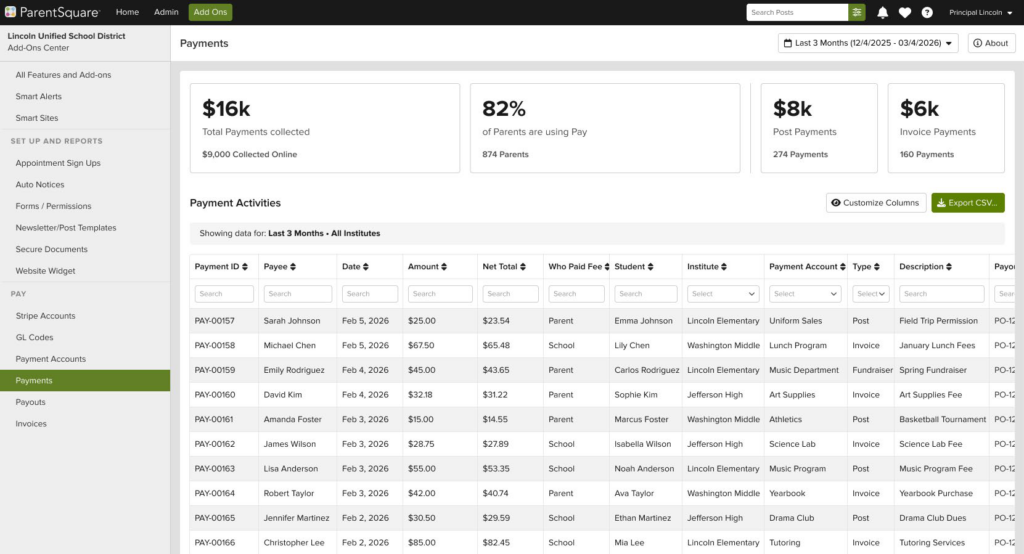
ParentSquare Pay gives districts a simple way to generate consolidated reports across schools and payment types, no matter how many school sites or bank accounts are set up. Both teachers and administrators can access the reporting at any time, so there’s no need for teachers to send spreadsheets — reducing manual exports and the chance of sending outdated information.
Moving toward fewer cash and check payments doesn’t have to mean onboarding teachers to a brand-new payments tool or asking families to download yet another app. It also shouldn’t mean just adding online payments to the mix of what staff, teachers, and bookkeepers already need to track and collect.
While this guide is designed to be used by any district looking to go cashless, it also highlights the role of an online payment tool that builds on existing communication channels, familiar workflows, and proven engagement outreach—all in a single system that millions of families already use and trust.
Get a head start on going cashless with ParentSquare Pay, including:
“We’ve kept talking about going cashless for years, and for the first time, that conversation is actually happening. Without ParentSquare Pay, we never would have gotten to this point.”
Whether you’re just getting started or looking to expand online payments, this month-by-month calendar of use cases helps you plan for the most common payments across the school year. Use this list to:


ParentSquare is the leading family engagement infrastructure helping K-12 districts nationwide reach every family with an award-winning, all-in-one communication platform. Reaching over 22 million students, ParentSquare helps districts consolidate disconnected tools and outdated communication systems with personalized messaging, websites, forms, payments, attendance solutions, and more—in one easy-to-use platform. With powerful features for achieving 100% contactability, two-way translation into 190+ languages, and purpose-built AI enhancements, ParentSquare empowers districts to invite every family to be involved in their student’s education, no matter their home language or the device they use.
Recognized for growth and innovation by Inc. 5000, GSV 150, and more, ParentSquare was founded in 2011 in Santa Barbara, California. Learn more at parentsquare.com.