



Stay informed with news, updates, and best practices on the ParentSquare blog.
Explore
Core Platform

Solutions for every role in your school community
Built for every type of school and district
See how we solve real challenges facing schools
Insights and ideas that add value to districts
A centralized hub for expert help and guidance

Set up effective ParentSquare Pay posts for field trips, fundraisers, yearbooks, and more
You may already use ParentSquare Pay for field trips or activity fees. But what about collecting pledges for a read-a-thon, taking monthly lunch orders, or organizing contributions for a class gift?
Schools collect payments like these with payment posts, which are regular ParentSquare posts that include a payment request, plus any forms or signups families need to complete.
This guide includes practical ideas you can adapt for your community, inspired by other schools using Pay. Start with the examples closest to what you already collect, or explore a new category. The calendar at the end can help you decide what to try next.
While the examples in this guide use posts, ParentSquare Pay also offers invoices, or bills sent to specific families for a required payment. Many payments can be collected either way, so some of the examples below note where an invoice is another option.
Before families pay, they need a few basic answers: What is this for? How much does it cost? When is it due? Is there anything else I need to do?
Put those answers near the top of your post. A few additional details can make the difference between a payment that families complete right away and one they set aside to ask about later.
Include the amount and identify the students or families who need to pay, whether that's a particular grade, class, or activity.
When helpful, connect it to a familiar milestone, such as the first practice or the day orders close. If missing the deadline means a late fee, waitlist placement, or canceled order, explain that too.
Families may appreciate knowing that an athletics fee covers transportation and equipment, for example, or that a fundraiser will help pay for field trips.
Give families a person or office to reach with questions. For payments that may be difficult for some families, consider including a contact for discussing financial assistance.
Sometimes, the payment is only one part of what you need. You may also be collecting signed permission slips for a field trip, volunteers or donated supplies for an event, or sizes for a hoodie order.
These requests can all be combined in the same ParentSquare post.
Not every post needs all of these. An activity bus pass, for example, may require only a payment and a short note.

Forms collect information and signatures, including permission slips, registration details, waivers, health questionnaires, and order selections. If a student must submit both a form and payment to participate, make that requirement clear.

Volunteer signups help organize chaperones, drivers, ushers, and other event helpers. Specific roles make it easier for families to decide where they can contribute.

Item signups let families choose supplies to bring. Include any quantities and drop-off instructions they'll need.

Field trips, overnight trips, college tours, competitions, and senior trips often involve several steps for families. Bringing the details, permission slip, payment, and volunteer signup into one post can make those steps easier to complete.
The two examples below also include a contact for families who may need help covering the cost.
A useful field trip post answers the questions families are likely to ask before departure: When should students arrive? When will they return? Should they bring lunch?
Include those practical details alongside the fee and permission slip. If the trip needs chaperones, a volunteer signup can give families a way to help without sending them to a separate request.
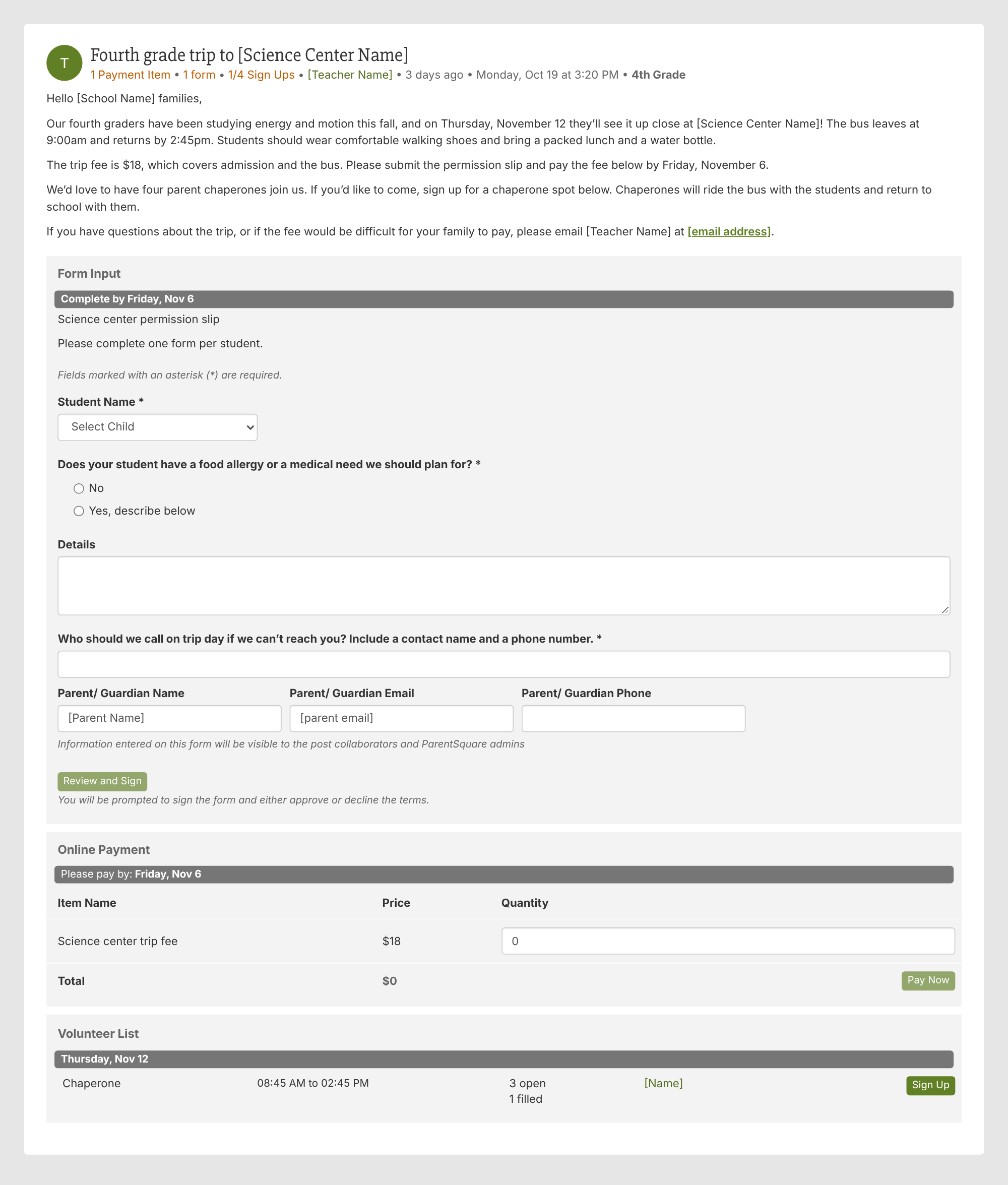
Try this: Review your next field trip post as though you’re a parent preparing a student for the morning. Anything you’d need to know before leaving home belongs in the post.
Overnight trips ask more of families than a day trip does. With nights away, you may need details such as dietary needs, medications, and an emergency contact, along with the permission slip and the trip fee.
Put the form and the payment in the same post. In this example, both are due on the same date, and a spot isn’t confirmed until both arrive.
Volunteer requests can be just as specific. Rather than asking generally for help, name the days and tasks you need, such as helping students onto the buses when the trip leaves and checking them in when they return.
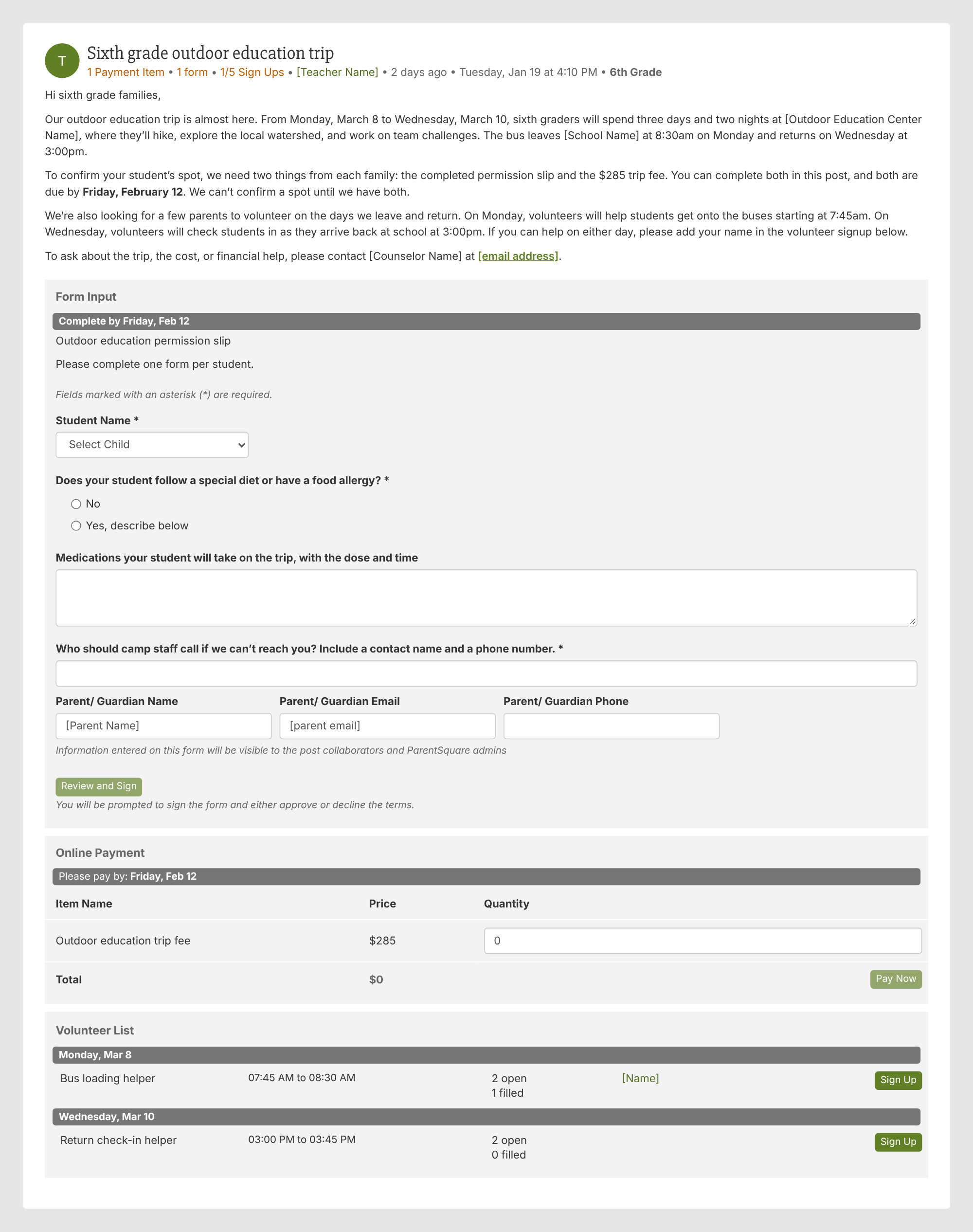
Keep in mind: If forms and payments must be submitted together, explain that process before families begin.

Registration and program payments come up throughout the year: tuition, registration, before and after school care, summer school, and camps.
ParentSquare Pay can help staff track these payments. Pairing a payment with a registration form or waiver also means families can complete related steps in one place.
Registration often involves more than one deadline. A family may need to pay a registration fee now, then a book and supply fee later.
In this example, the registration deadline is paired with the consequence of missing it, whether that’s a late fee or a waitlist spot. Families can also review the attached tuition and fees schedule and student handbook before paying.
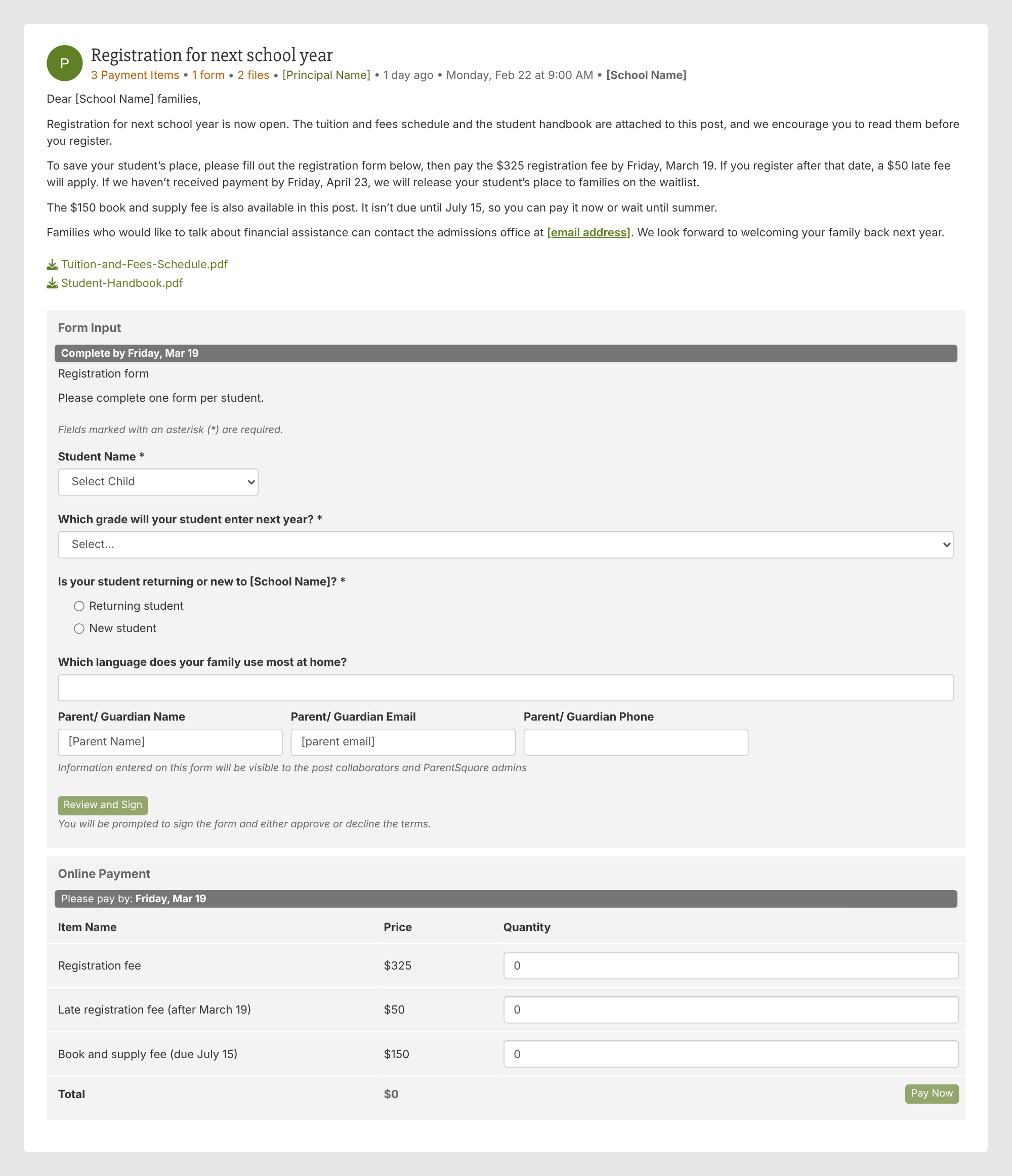
Try this: If you collect several fees during enrollment, include a short schedule showing what’s due now and what comes later. The same approach works for tuition billed by term.
Before and after school care is paid for month after month, so it helps to give families one post they can come back to.
If what each family owes depends on their care schedule, an open amount lets families enter what they owe, while the notes field lets families add a short note with any detail staff need to match the payment to the correct bill. If every family pays the same amount, a fixed price fits instead.
In this example, families enter the amount from their latest statement, and the post makes clear that it is specifically for care payments, avoiding confusion with other school fees.
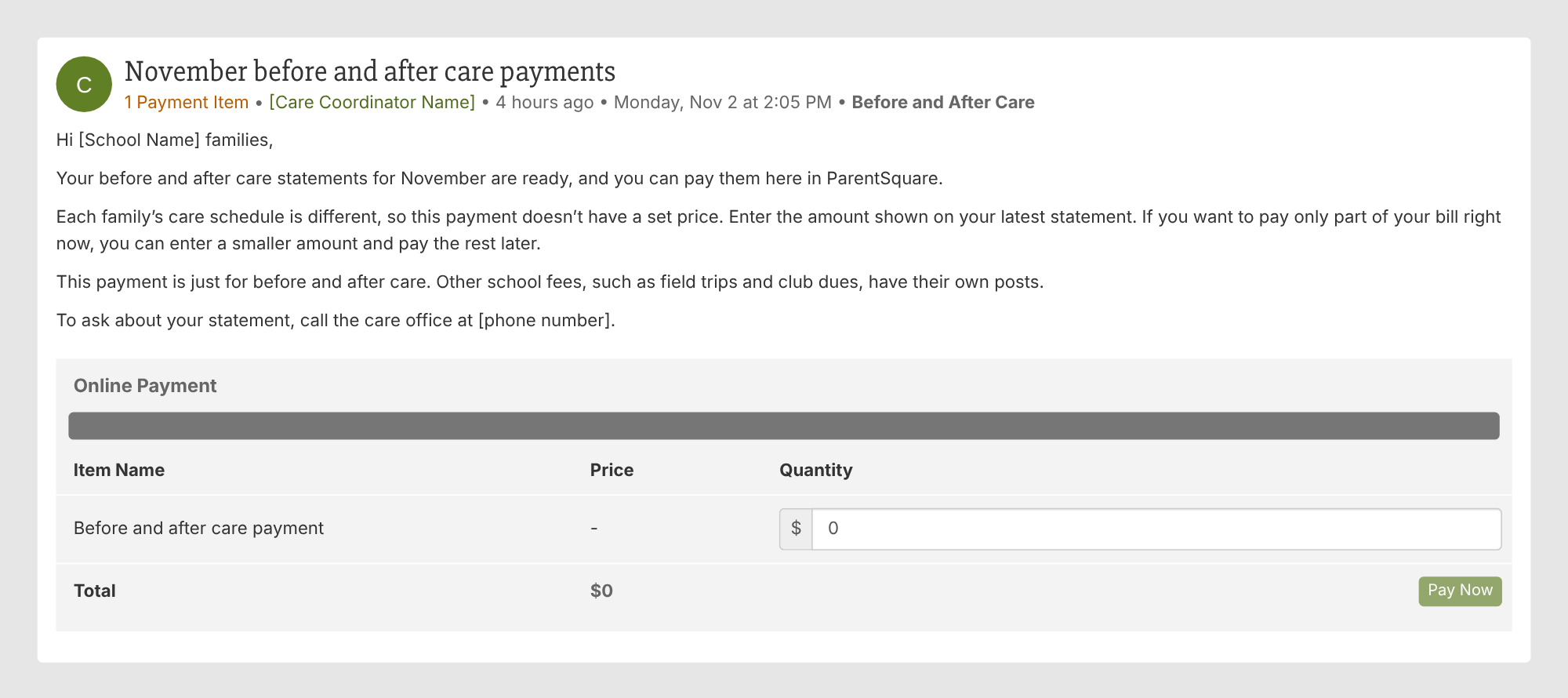
Another option: If you’d rather bill each family for a specific amount, ParentSquare Pay also supports invoices for after-school programs.
Summer programs may require student information, such as the current teacher and any allergies or medical needs, along with payment before a student can attend.
This example brings the registration form and payment into one post. It also shows how an optional extra, such as extended day, can be offered as a separate payment rather than included in every family’s total.
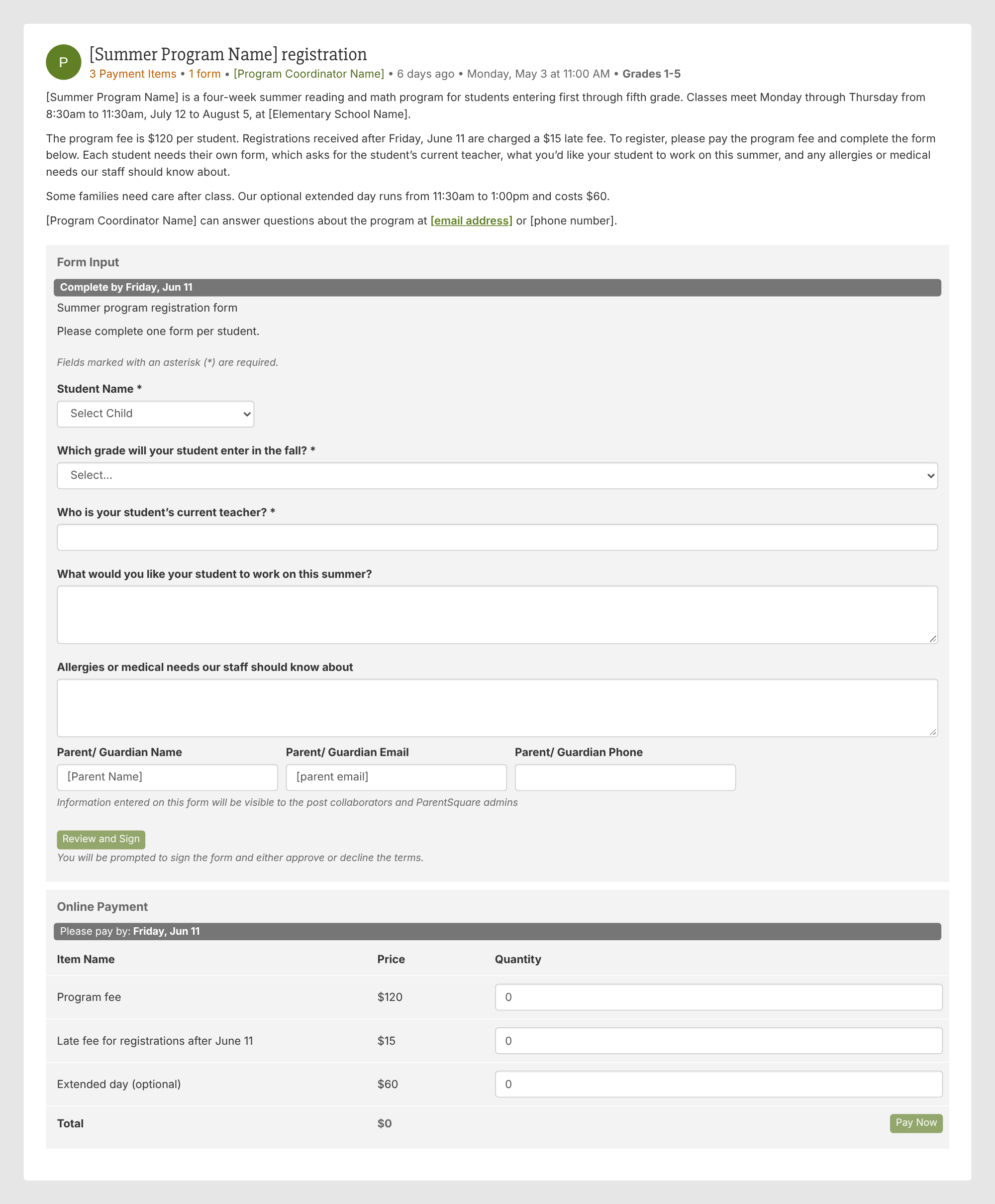
Keep in mind: Distinguish required enrollment steps from optional additions so families know exactly what they need to complete.

Athletics, band, choir, theater, and clubs each ask families for money when a student joins, whether that’s a fee to play, a participation fee, an instrument rental, or club dues.
Many of these payments come with something else you need from families, such as a waiver or an instrument form. Bringing the form and the payment into one post can make it easier for families to complete both at the start of the season or school year.
At the beginning of a season, families need to know what they’re paying for and when the fee is due.
A post can connect the deadline to the first practice, include a required waiver, and explain whether the fee covers one sport or each sport a student plays. Naming what the fee supports, such as bus transportation to away games, game officials, or replacement uniforms, provides useful context.
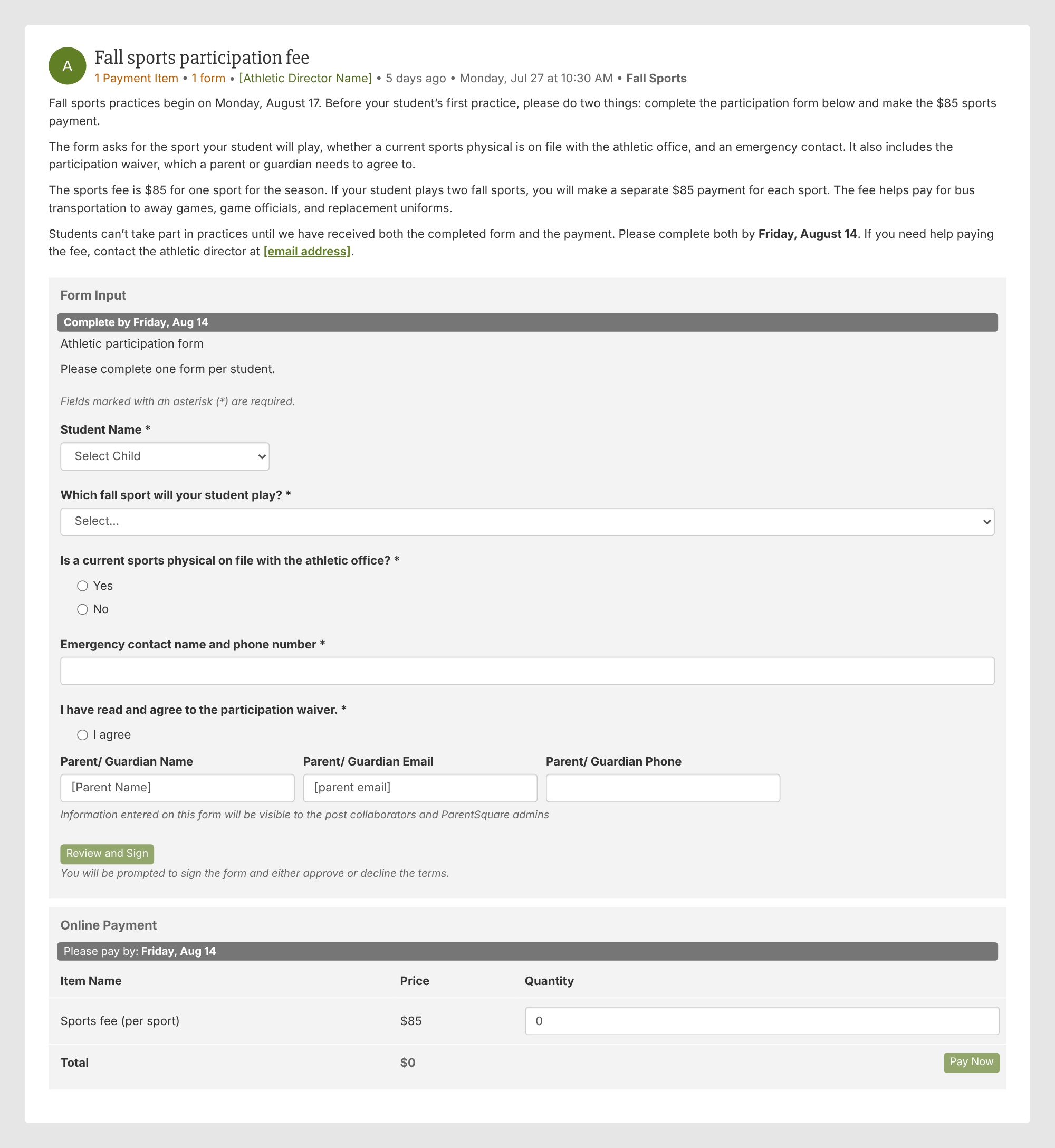
Try this: If your school collects separate fees for several activities, check whether families can easily tell which payment applies to their student.
Music and theater programs can bring a few different costs, from a participation fee to an instrument rental. Say what the participation fee covers, such as sheet music, repairs for school instruments, or printed concert programs, and list any rental as its own payment so families who use their own instrument pay only the fee.
In this example, a form asks whether the student needs a rental, and the post handles the fee and the rental as separate payments.
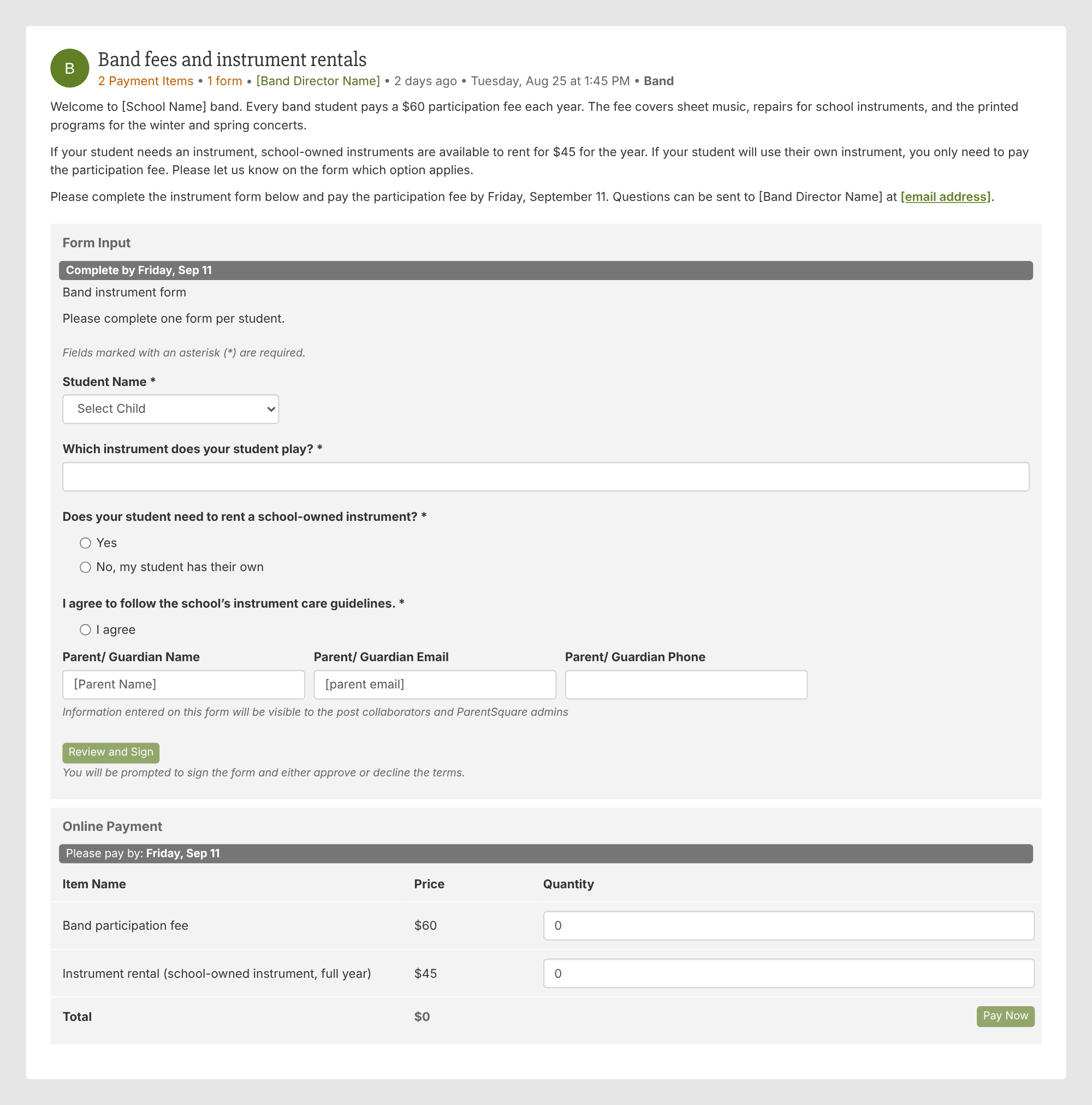
Try this: If students also need to agree to something, such as instrument care guidelines, add the agreement to the same form so you collect it along with the fee.
Club dues are a good fit for one post that covers every club in the school, as long as you can tell which payment belongs to which club. The notes field lets families add a short note with their payment, so ask them to enter the name of the club. If a student joins more than one club, ask for a separate payment for each.
In this example, the post says what dues pay for and sends questions about a club to the advisor and questions about a payment to the front office.
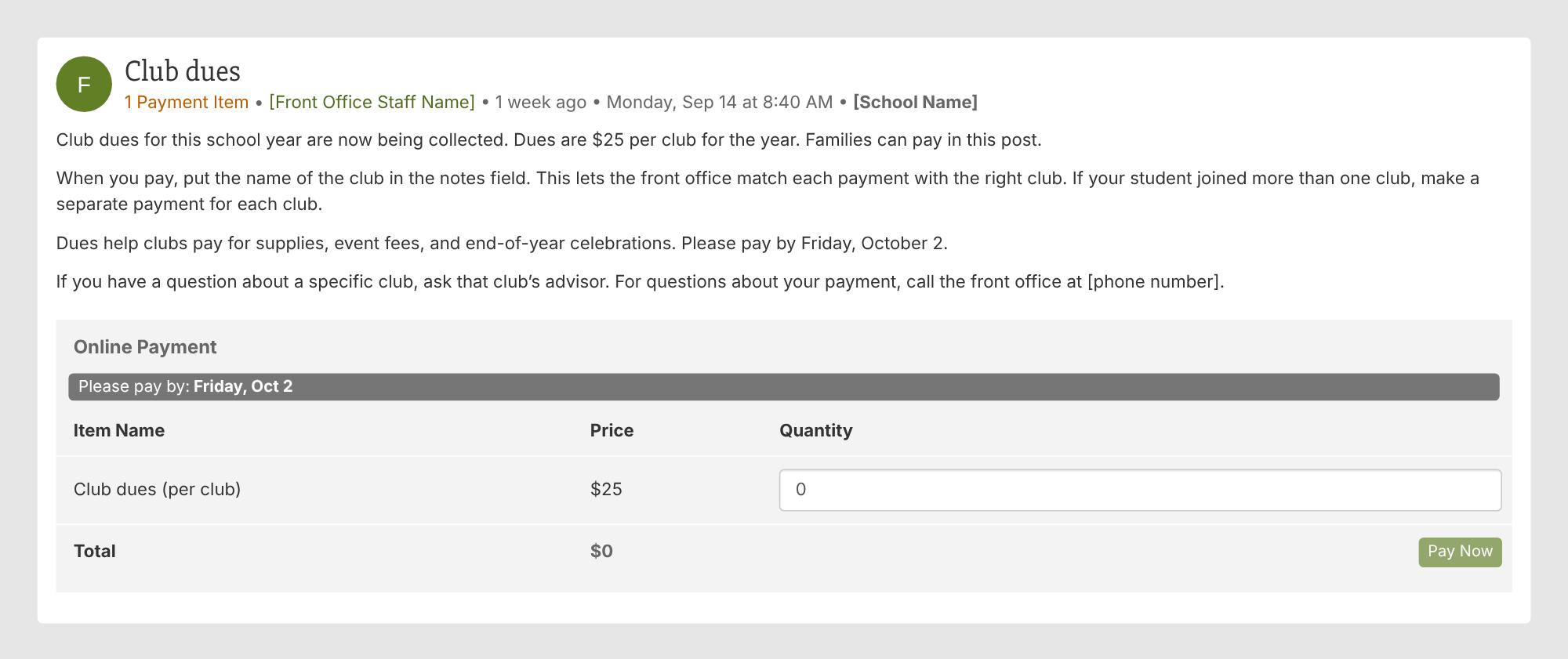
Keep in mind: Tell families exactly what to put in the notes field, so each payment can be matched to the right club.

Ticket sales may be the first use that comes to mind, but an event post can do more. Schools can collect sponsorships, accept pledges, organize volunteers, and gather supplies alongside payments.
The examples below offer ideas for performances, graduation, fundraisers, and class gifts. Similar approaches work for fall festivals, dances, and other school events.
A school performance is an opportunity to go beyond ticket sales. Volunteers can help with setup, ushering, and cleanup, and families can bring items for a treat table, with signups that show which jobs and items are still needed.
This example combines ticket sales for a talent show with a volunteer signup that gives each job its own time and an item signup for the treat table.
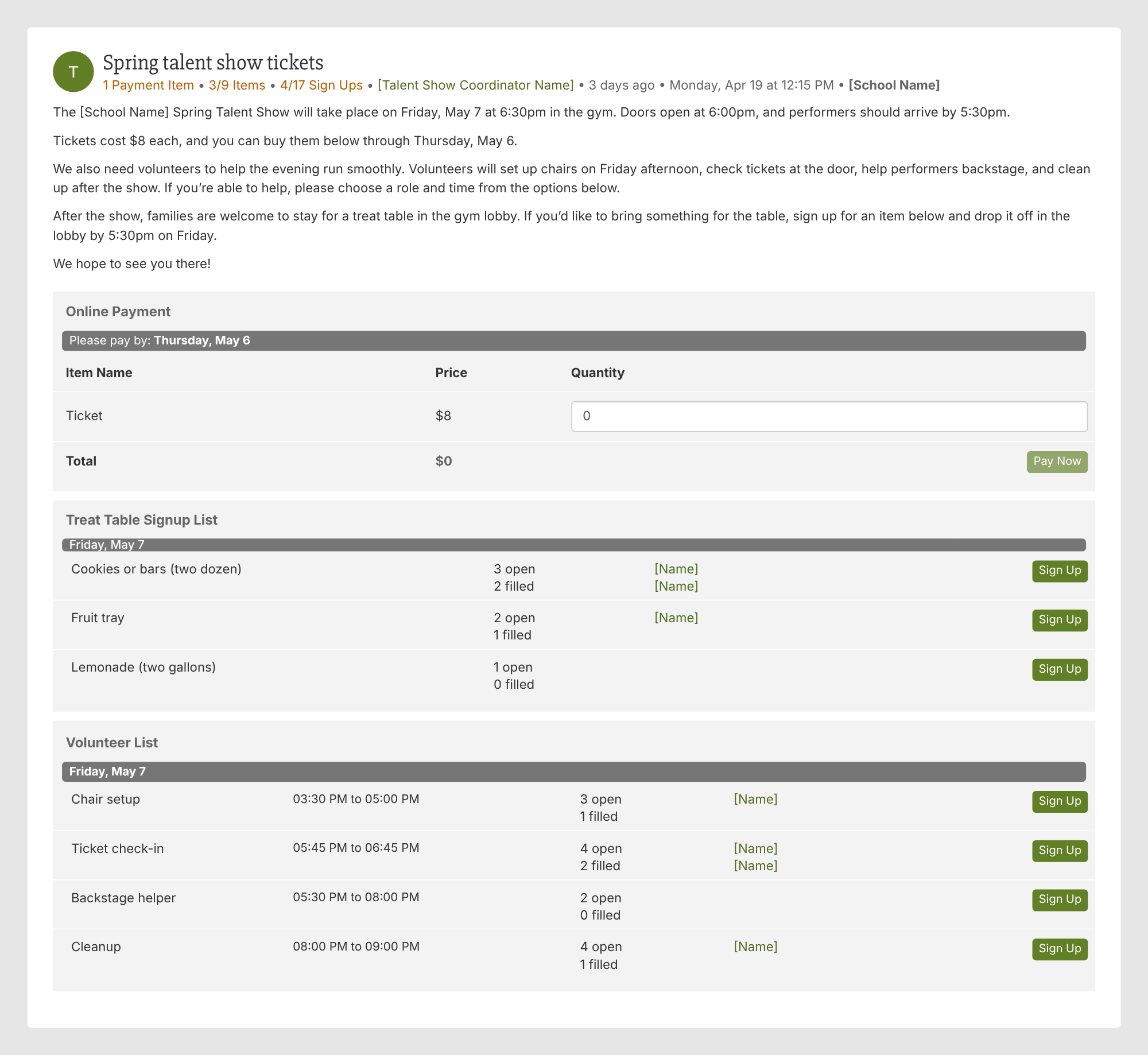
Try this: For your next performance, consider whether ticket sales, volunteer opportunities, and a request for items could be organized in one post.
Graduation often involves several purchases at once, such as a cap and gown, a diploma cover, and tickets for guests. The example presents those items as a package, then explains what families receive with a second package that adds a prom ticket.
Families also need to know that they pay the full amount for the option they choose, so the post says so and gives a contact for families who need help with the cost.
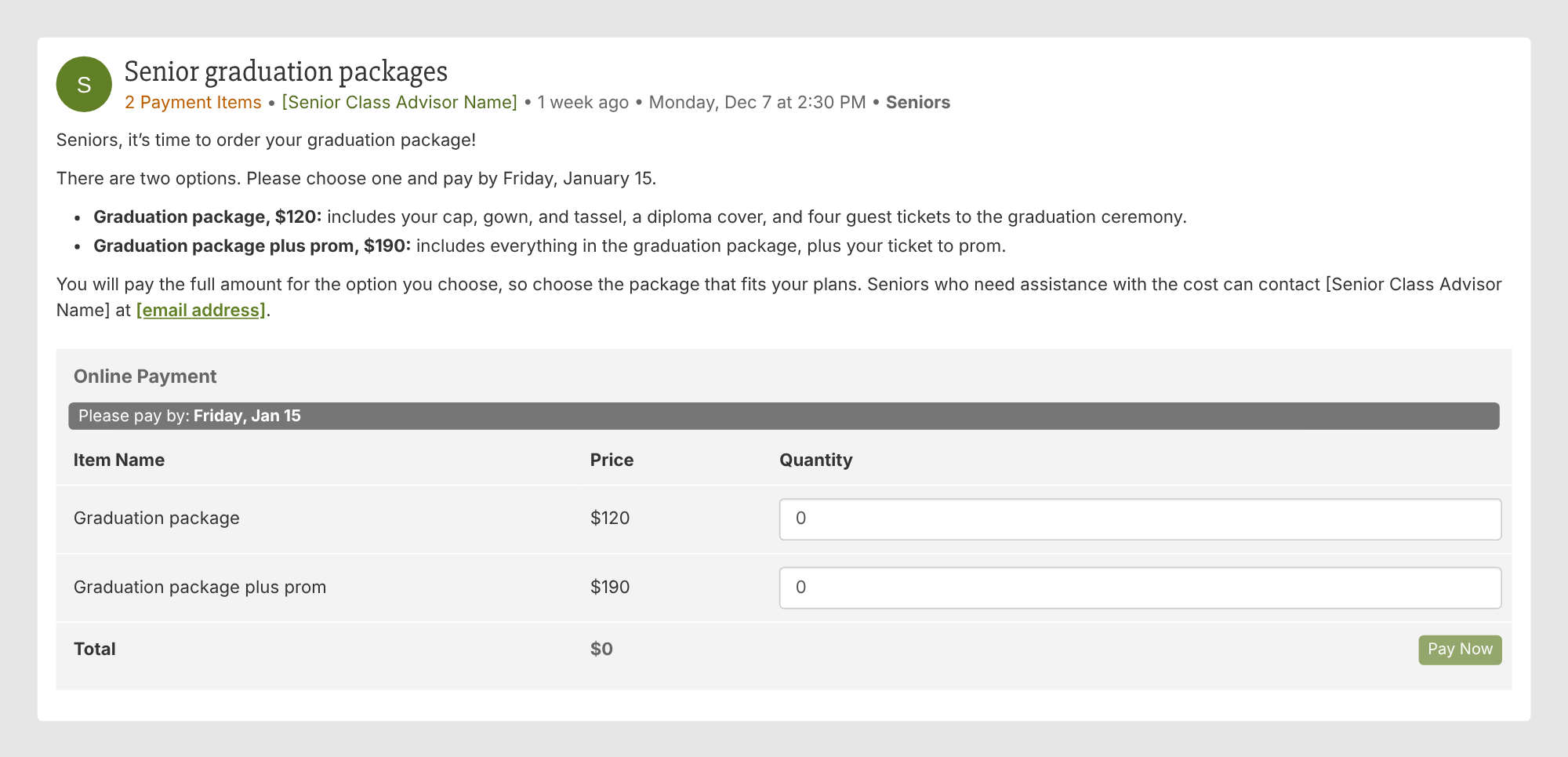
Try this: Show the base package and optional additions side by side so families can compare them without piecing together information from several messages.
A read-a-thon can use suggested pledge amounts, such as $5, $20, and $40, while leaving room for supporters to give a different amount.
In this example, pledges are a flat rate, so families don’t have to calculate a total based on pages or minutes read. The post also describes a school-wide goal and a reward, and explains that the pledges will go toward new books for classroom libraries and an author visit.
An open amount lets supporters choose their contribution, while guest payment allows friends and family outside ParentSquare to participate. The notes field lets supporters add a short note, such as the name of the student they’re supporting.
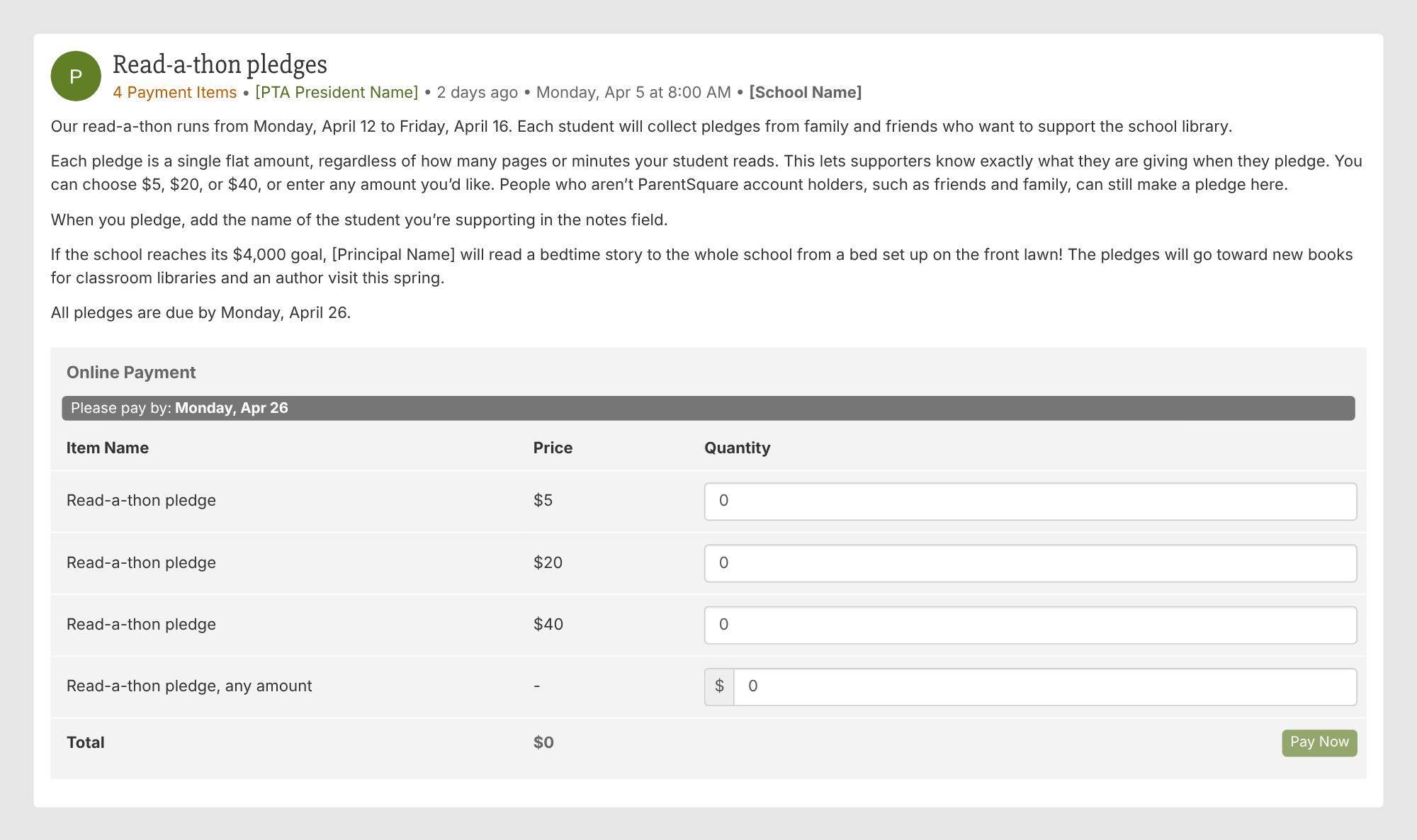
Keep in mind: Be explicit about whether pledges are flat amounts or based on student activity. That distinction changes what supporters expect to pay.
Not every fundraiser needs to be a major campaign. A payment post can also help families contribute to a shared gesture of appreciation, such as a class party or a gift for the teacher.
For a class gift, the most useful details are straightforward: what the money will pay for, how much each family is asked to give, and when contributions are needed. In this example, party snacks and craft supplies come first, and anything left over goes toward a gift card for the teacher.
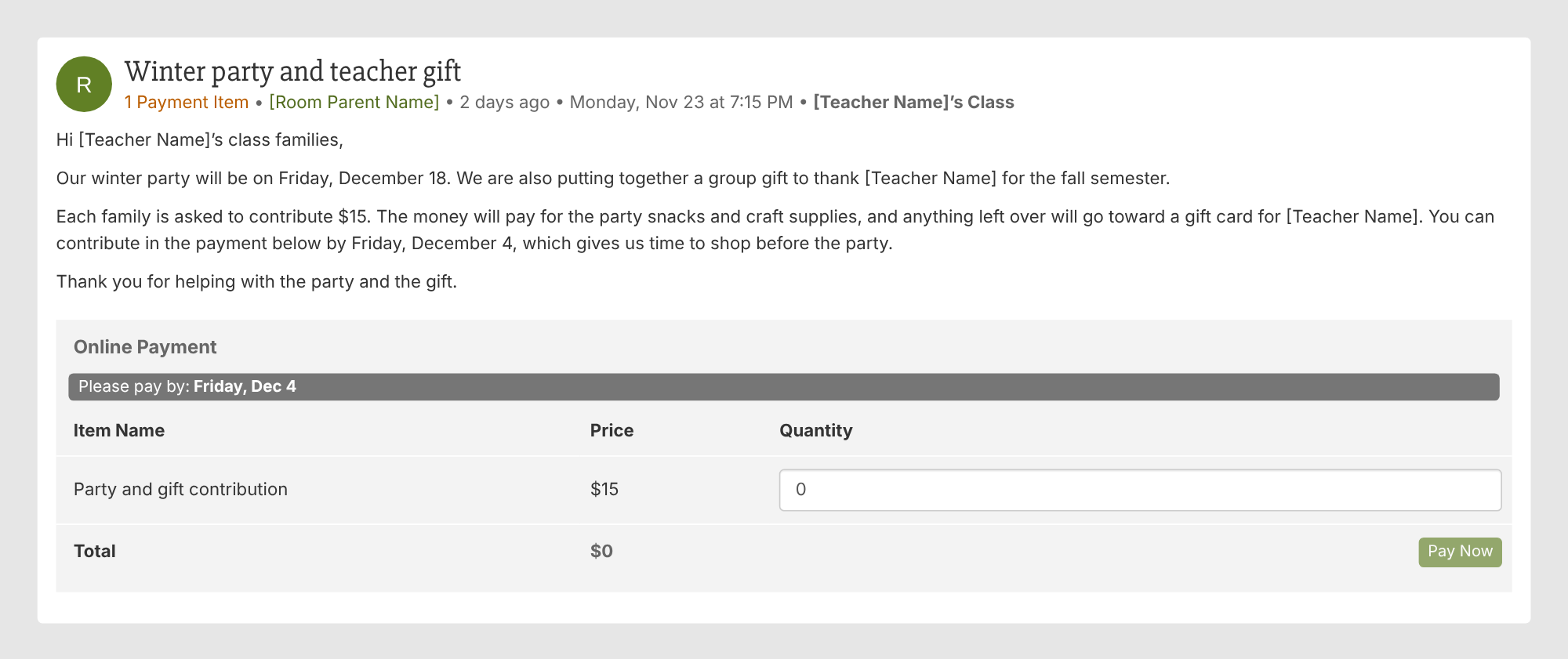
Try this: The same approach could work for holiday gifts or end-of-year teacher appreciation. Set the contribution deadline early enough to leave time for planning.

School orders often require families to make a selection as well as pay: a hoodie size, lunch dates, or the name for a yearbook cover.
A form can collect those choices alongside the payment. That approach also works for uniforms, school pictures, and candygrams.
A hoodie order needs more than a payment amount. Staff also need to know which size to order and which classroom to deliver it to.
This example uses a form to collect those details and allows families to submit one form per student. It also sets an order deadline that leaves time for delivery before winter break and gives families a contact if they need help.
One idea worth borrowing is the option to donate toward a hoodie for a student who needs one. An open amount lets families contribute what they can.
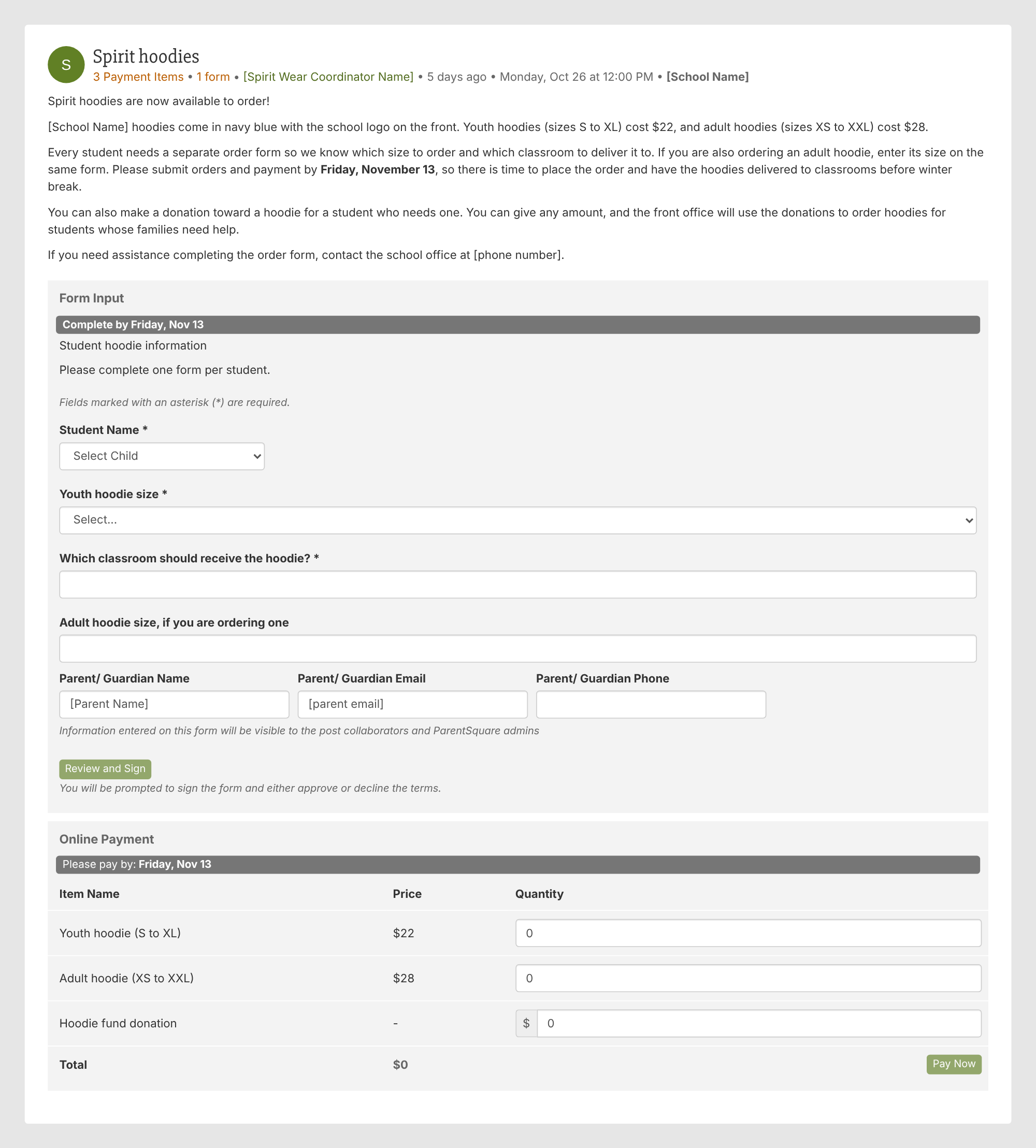
Keep in mind: Build in enough time between the order deadline and delivery to receive, sort, and distribute the hoodies.
Monthly lunch ordering is a useful example of how a payment post can handle recurring choices, not just a single fee.
The example lists each weekday as its own monthly option so families can choose the days they want, and the Friday options let them choose a meal. It also explains the order deadline, whether same-day orders are accepted, what happens if a form arrives without payment, and any dates when lunch won’t be offered.
Price changes should be easy to spot, especially for families accustomed to the previous month’s menu.
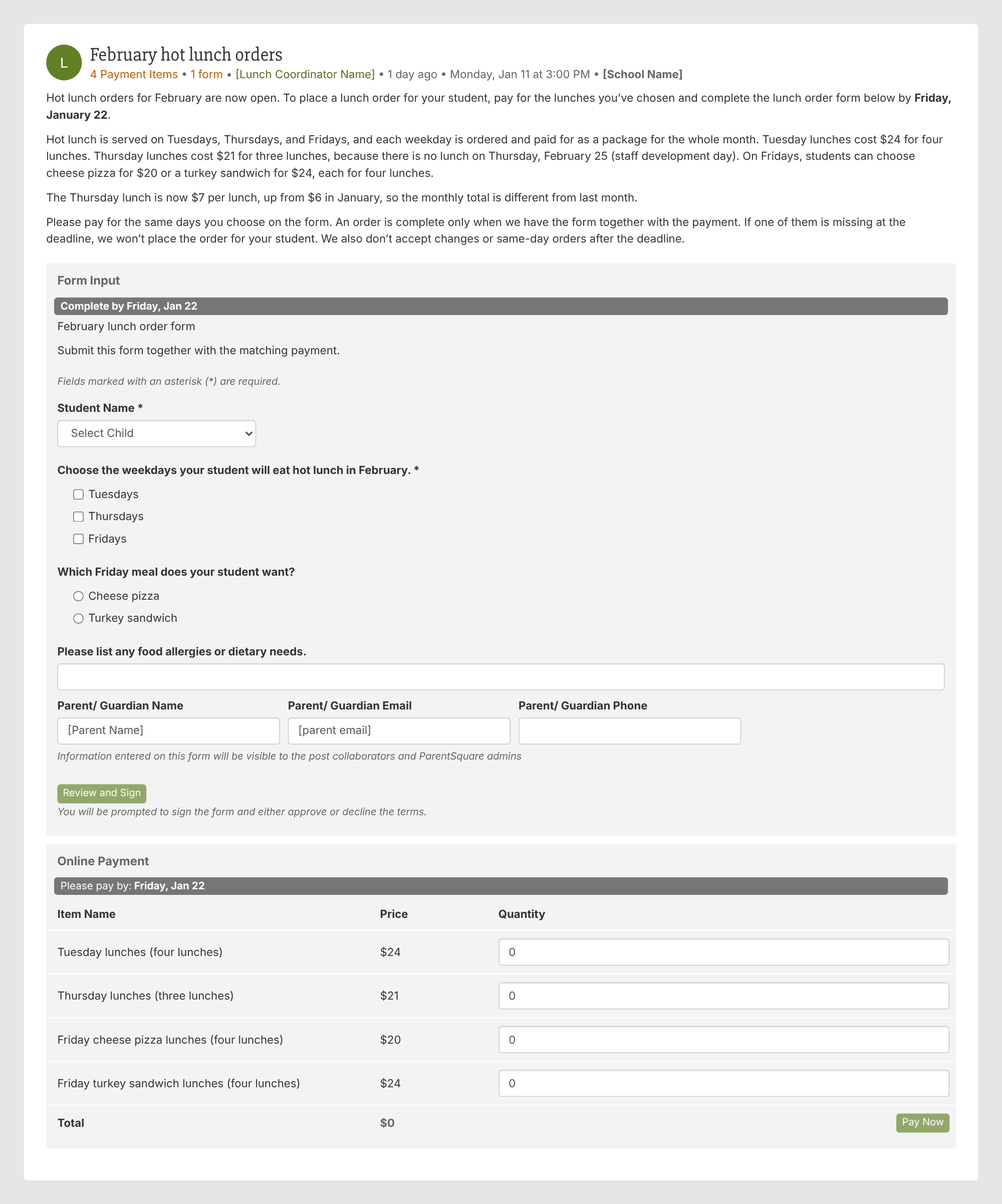
Try this: If your school collects lunch payments through another process, consider whether a monthly post could bring selections and payments together. Lunch balance preloads in August and balance collections in May are other possibilities.
Yearbooks, school pictures, and senior portraits can all go in a payment post, so you can take orders in the same place families already get your updates. If you need extra details, such as the student’s grade or the name for a cover stamp, add a short form.
This example sells yearbooks as a pre-order. The price is lower before the deadline, and the post says how much families save by ordering early. A cover name stamp is offered as a separate payment.
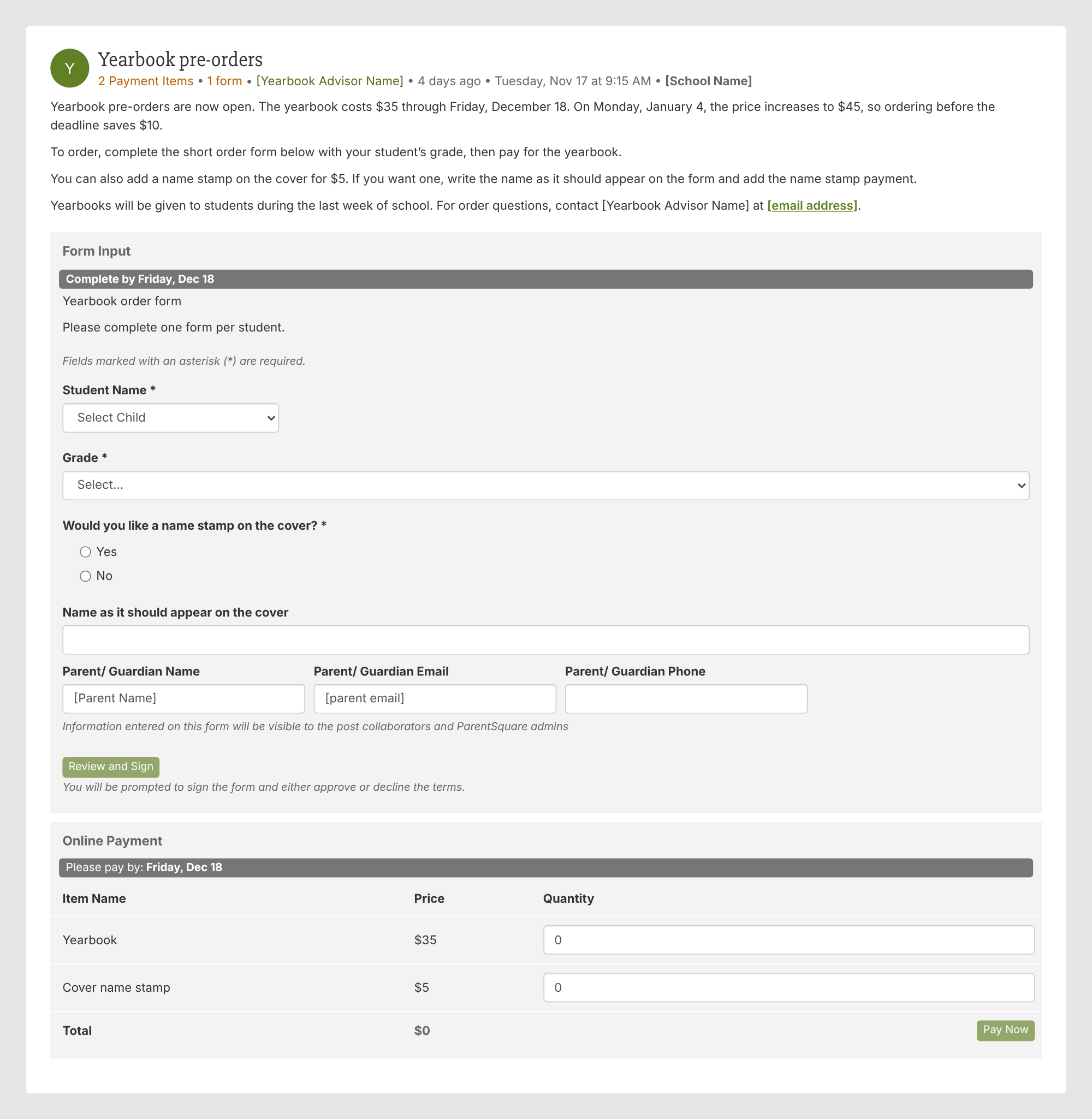
Try this: If you offer a pre-order price, tell families what the price will be afterward and when it changes, so the deadline has a clear reason.
Whether it’s candygrams, flowers, a book fair, or a bake sale, families need to know what’s for sale, what each item costs, and when orders close.
Candygrams include one more detail, because each order goes to a specific person. This example uses a form to collect the recipient’s name and classroom and the message, with one form and one payment for each candygram, and it offers a version with a flower as a separate payment. The post also says what the proceeds support.
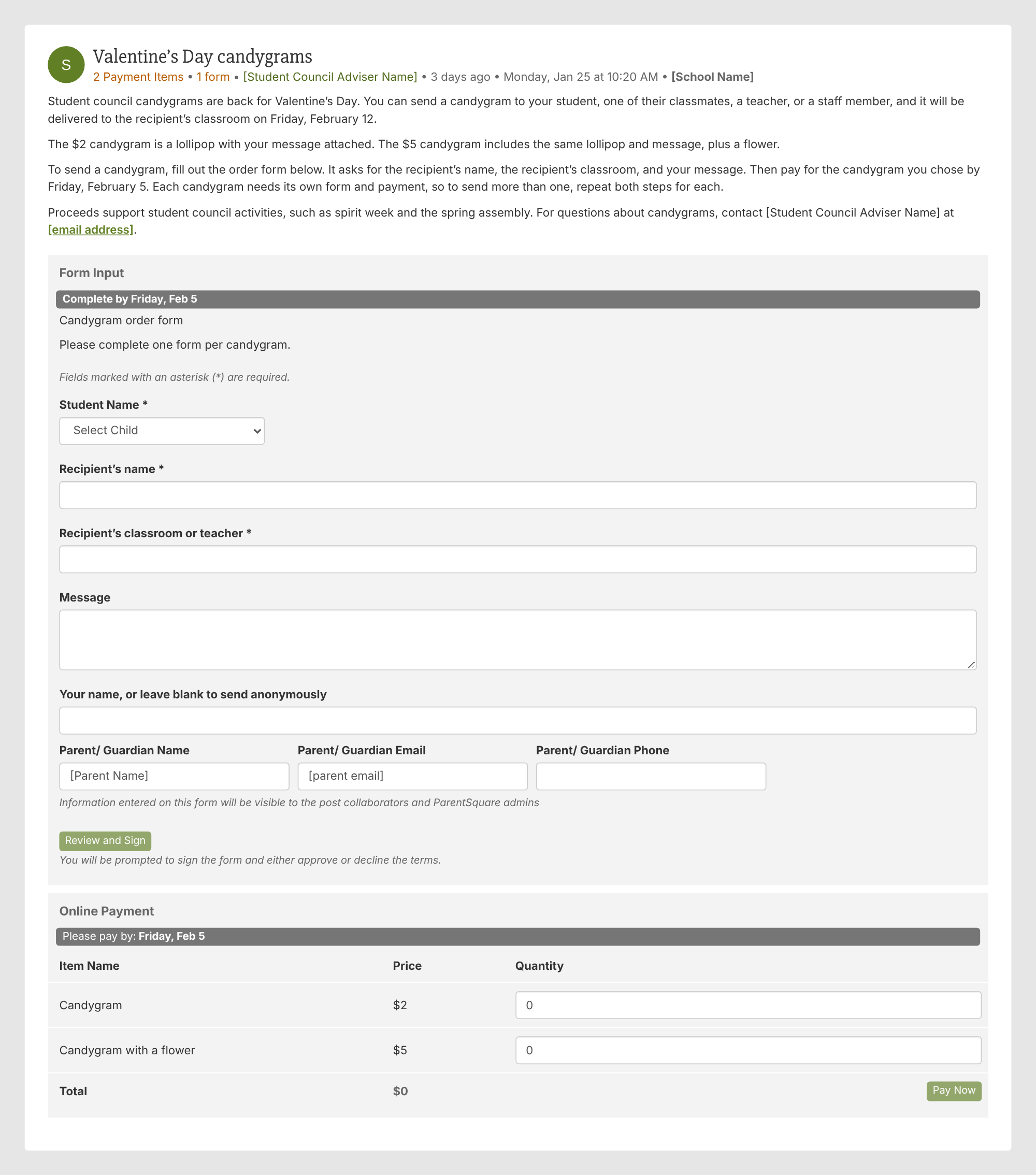
Keep in mind: If each order goes to a different person, tell families to submit a separate form and payment for each one.

Some school payments are routine, like technology fees or exam fees. Others arise only when a student needs a bus pass or must pay for a lost book.
For these payments, the post can be brief. The important part is giving families the right amount, any required agreement or identifying details, and a clear next step.
You can also use ParentSquare Pay invoices for fees associated with technology, athletics, extracurricular activities, and after-school programs.
Course fees vary by student, because each family pays only for the courses their student takes. List each fee as its own payment so families can pay for just the courses on their student’s schedule, and say what the fee covers, such as lab materials, art supplies, or workbooks.
In this example, the post also points families to the student’s schedule to check which courses apply. The same setup works for lost books.
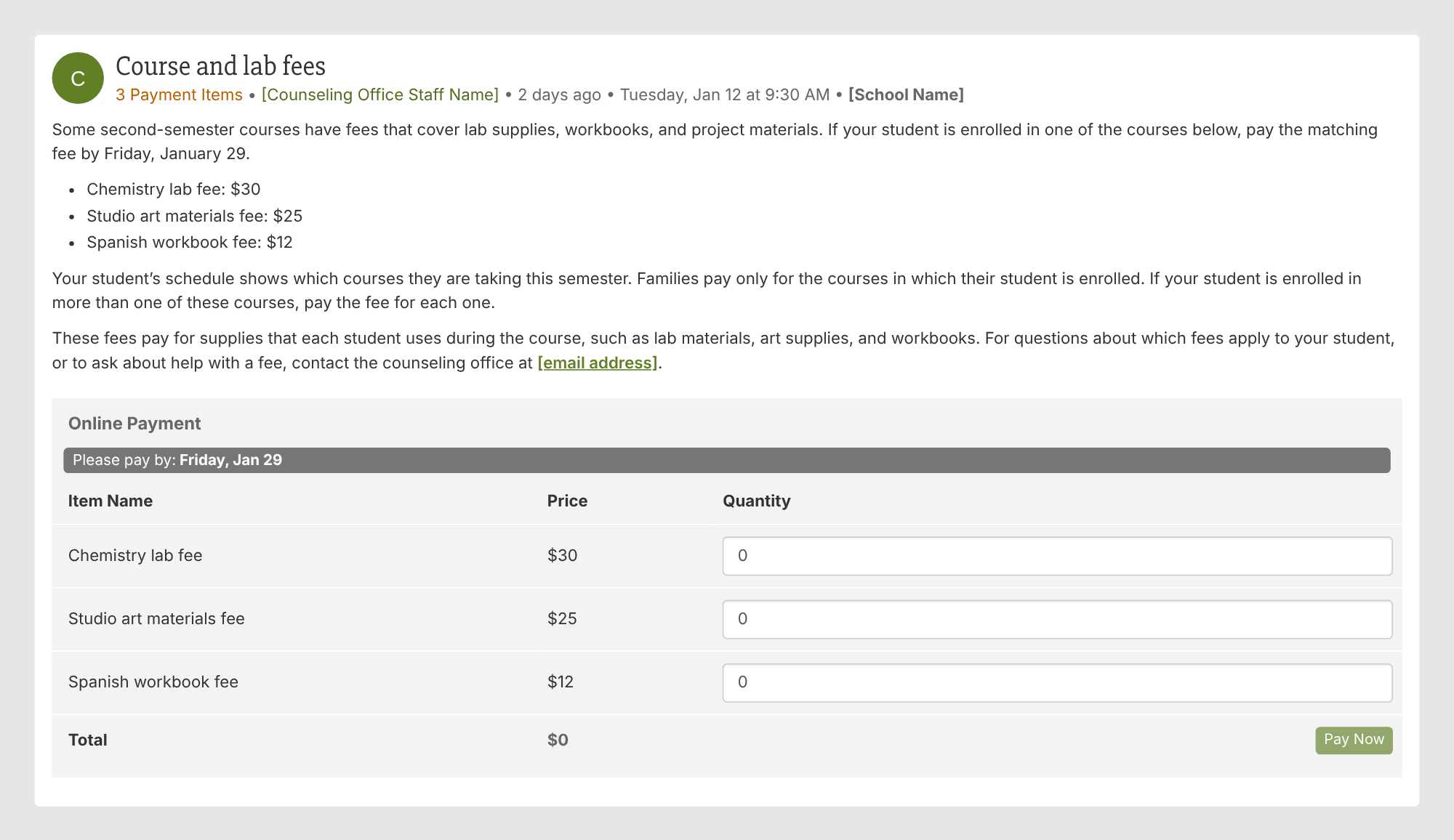
Keep in mind: If a student is enrolled in more than one course with a fee, tell families to pay for each one.
If a technology fee must be paid alongside a device agreement, families should be able to complete both in the same post.
The example identifies which grades the fee applies to and explains what happens after the payment and agreement are complete, such as when a student can take the laptop home.
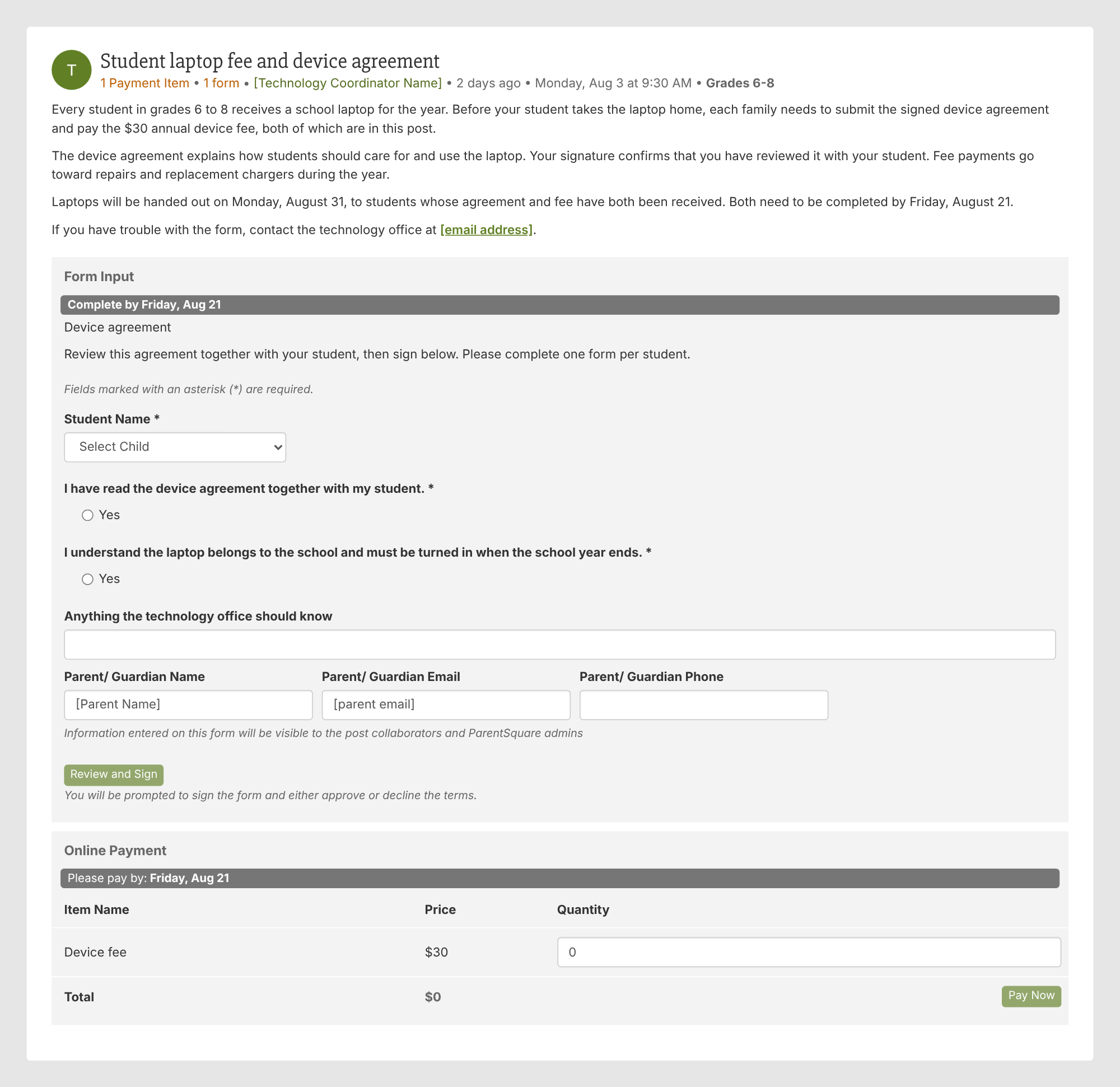
Keep in mind: Be clear about whether both steps are required. A completed payment may not be enough if the agreement is still outstanding.
Advanced Placement (AP) exam payments can vary by student because each student may register for a different number of exams.
In this example, a form collects the exams being taken, while a quantity option lets families pay for the number they selected. That works when each exam has the same fee, such as $105.
The approach can also apply to PSAT, SAT, and ACT fees.
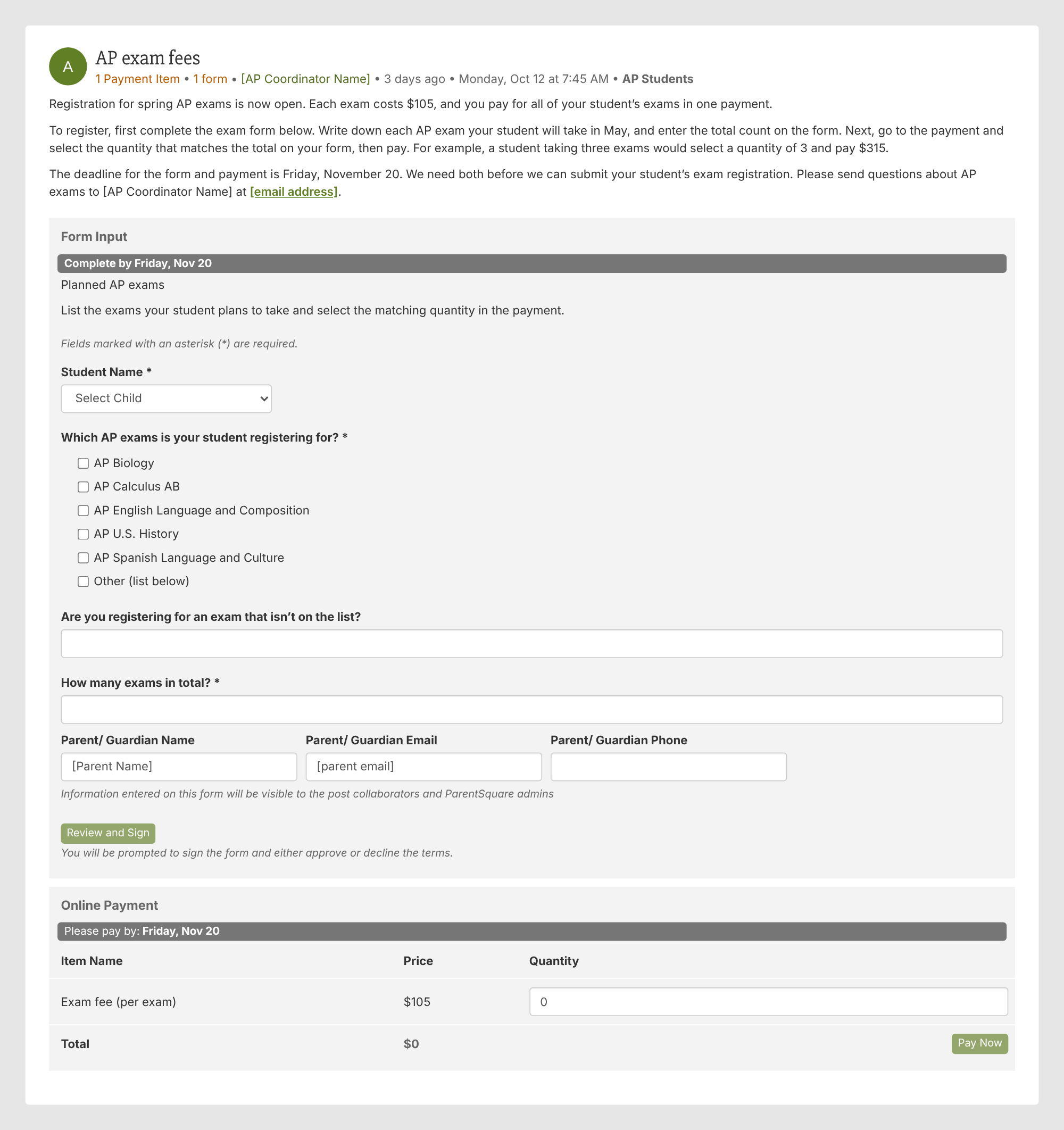
Keep in mind: ParentSquare doesn’t track inventory, so schools still need their own way to monitor any limited quantities or available spots.
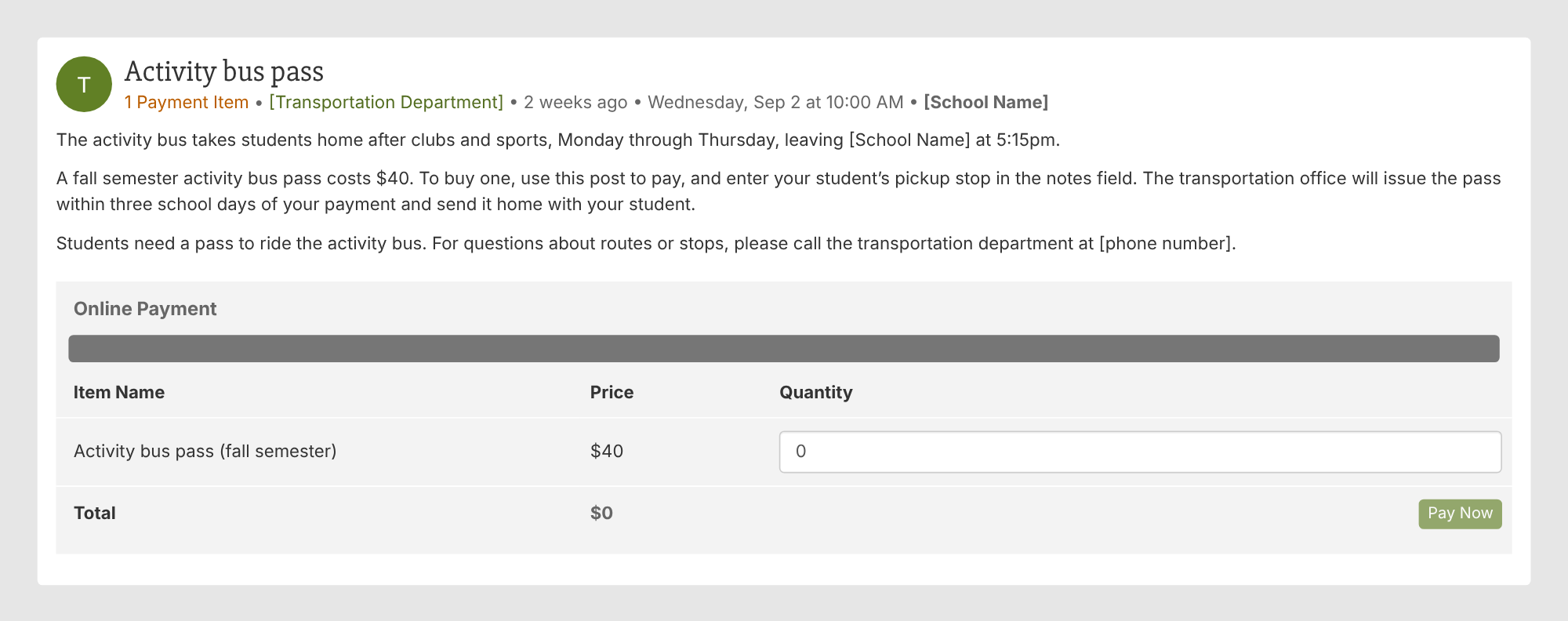
An activity bus pass doesn’t need a long explanation or an elaborate form.
The example uses a short payment post and the notes field to collect the student’s pickup stop. That gives staff the detail they need to issue the pass.
The same simple setup can work for other transportation charges, such as bus tags.
Once you’ve tried a few payment posts, the next opportunity may already be on your school calendar.
Use the list below to look ahead. Some payments may already run through Pay; others could be worth trying the next time they come around. The examples in this guide offer starting points for many of them.
You don’t have to change how your school collects every payment at once. Look at what’s coming up in the next month or two and choose one opportunity.
It might be a familiar payment you’d like to organize differently, such as combining a field trip fee and permission slip. Or it might be something new, like pledges for a read-a-thon or contributions for a class gift.
Find the closest example in this guide and use it as a starting point. Check what families need to know, decide whether a form or signup would help, and adapt the post to your school’s process.
At Pearl River County School District in Mississippi, Technology Integration Specialist Tara Poolson says that once staff saw how families responded, they started asking, “Could we use this for such-and-such too?”
That’s a useful question to take into your next planning meeting. What’s one more payment your school could collect through ParentSquare Pay?
